Garnet Framework has evolved with architectural improvements for better cost efficiency and scalability. This documentation is current and reflects these changes, though we continue to expand certain sections with additional examples and detailed guidance.
Thank you for your patience as we complete this update.
Building Context Producers
Context Producers are components that extract data from various sources and transform it into NGSI-LD compliant entities for ingestion into Garnet's knowledge graph. They serve as the bridge between your existing data sources and the unified contextual layer that Garnet provides.
Overview
A Context Producer's primary responsibility is to take data from any accessible source and convert it into standardized NGSI-LD entities. These entities can then be delivered to Garnet through various methods, such as the SQS ingestion queue for batch processing or directly to the NGSI-LD Context Broker API for immediate updates. This transformation process enables data from disparate systems to become part of a unified knowledge graph where it can be correlated, analyzed, and consumed by various applications.
Context Producers operate independently from Context Consumers, allowing you to develop and deploy data ingestion capabilities without needing to modify existing applications or wait for consumer development. This decoupling accelerates development velocity and enables incremental system evolution.
Architecture Overview
The Context Producer architecture consists of two main steps:
- Data Ingestion: Extract data from the source system using the appropriate interface and technology
- Data Transformation: Convert the raw data into NGSI-LD entities and deliver them to Garnet through the appropriate method (SQS ingestion queue for batch processing, direct NGSI-LD API calls for immediate updates, etc.)
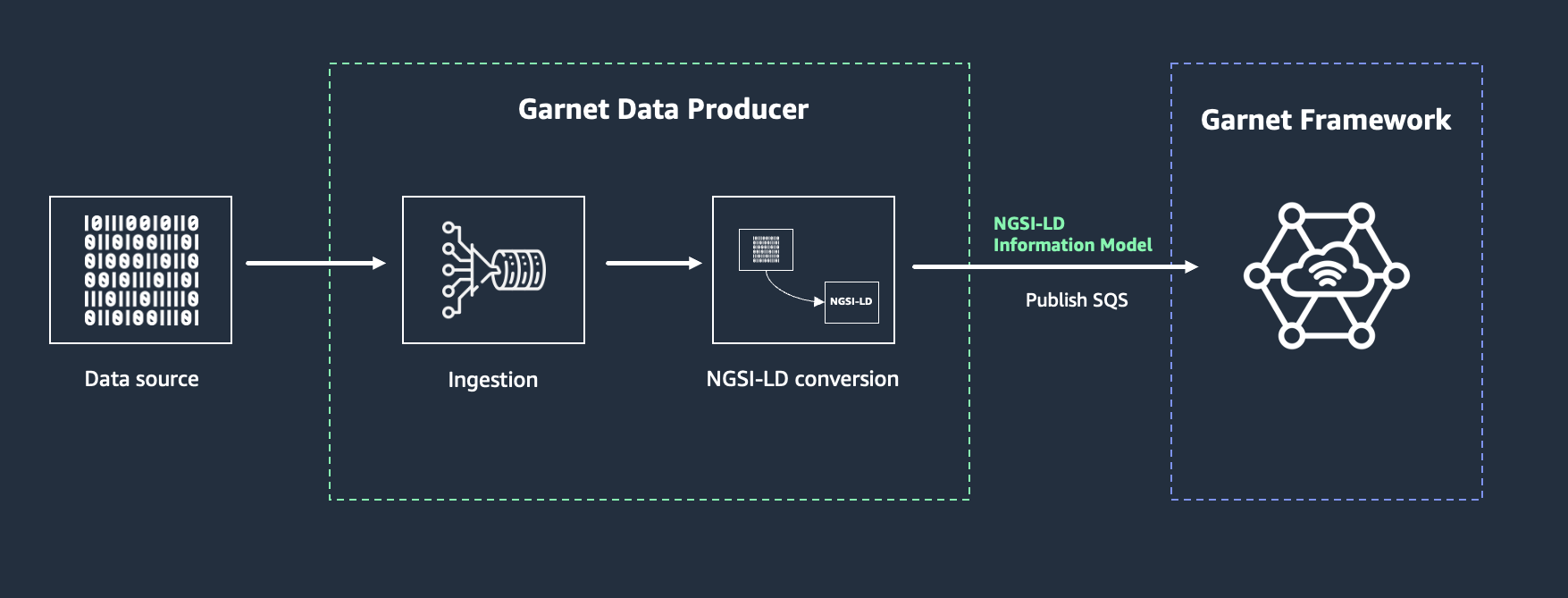
You can build Context Producers using any technology stack, whether on-premises or in the cloud. Using AWS services provides access to a comprehensive set of tools including compute, database, IoT, analytics, and AI services that can enhance your Context Producer capabilities.
Mapping Data Sources to NGSI-LD Entities
When building Context Producers, you need to make several key design decisions about how to map concepts from your data sources to NGSI-LD entity representations in the knowledge graph. This approach is flexible and spans across different domains and use cases. Here are some scenarios that illustrate the diversity of applications, though the possibilities are virtually limitless:
Scenario 1: Bike Sharing System
Your bike docking stations send status updates every few minutes about available bikes and docking spaces. Each update needs to consistently update the same BikeHireDockingStation entity, not create duplicates. The station ID from your bike sharing system becomes the key to maintaining this consistency - for example, if your data source provides station ID "BS001", you would use it as the unique identifier in the NGSI-LD URN: urn:ngsi-ld:BikeHireDockingStation:BS001.
Scenario 2: Customer Relationship Management
Your call center system generates call logs, customer interactions, and agent assignments. When a customer calls multiple times, each CallLog entity needs to link to the same Customer entity through consistent customer identification. Additionally, agents, tasks, and promotions all need to reference the correct customer entities to maintain relationship integrity.
Scenario 3: Agentic Systems
Your autonomous agents generate observations, make decisions, and use various tools. Each agent interaction needs to update the correct Agent entity while linking to the appropriate Tool entities they're using. The agent's unique identifier ensures all its activities are properly attributed and its knowledge base remains consistent.
Scenario 4: Multi-Source Integration
You have both real-time sensor data and periodic maintenance records for the same physical device. Both data sources should update the same Device entity using a consistent device identifier, regardless of which system provides the data first.
The core mapping process involves several key decisions:
Entity Identity: Establish consistent identifiers that map your data source IDs to NGSI-LD entity IDs. The same real-world concept should always map to the same entity identifier, regardless of which data source provides the information.
Entity Types: Choose entity types that create meaningful vocabularies for your applications. Consider using multi-typing (e.g., ["Sensor", "AirQualitySensor", "IndoorAirQualitySensor"]) to enable queries at different levels of specificity.
Relationships: Design connections between entities that reflect your domain's structure. Simple attributes can evolve into separate entities with relationships as your system grows in complexity.
For comprehensive guidance on entity identity, types, granularity, relationships, and advanced patterns, see Design Considerations.
Data Delivery Options
Once you've transformed your data sources into NGSI-LD entities, you need to deliver them to Garnet. Context Producers can deliver transformed NGSI-LD entities to Garnet through multiple methods:
- SQS Ingestion Queue: Uses SQS as a buffer for reliable delivery, particularly useful for high-volume data ingestion. The SQS ingestion performs batch upsert operations to the context broker with the
options=updateparameter to preserve existing attributes while updating only those provided in the payload - Direct NGSI-LD API: Direct API calls without buffering
The examples in this section primarily use the SQS ingestion queue for demonstration purposes. For detailed information about both delivery methods, including configuration and best practices, see Ingesting NGSI-LD Data and Using the NGSI-LD API.
Context Producer Examples
Let's explore practical implementations for different data source types, demonstrating how to apply the entity linking concepts in real scenarios.
The following examples focus on the core concepts of data transformation and entity modeling. Implementation details like sendBatchToSQS() functions are simplified for clarity. For complete implementation guidance, including SQS batch message sending, IAM permissions, error handling, and other technical details, refer to Ingesting NGSI-LD Data and the AWS SQS documentation.
Fetching Data from External APIs
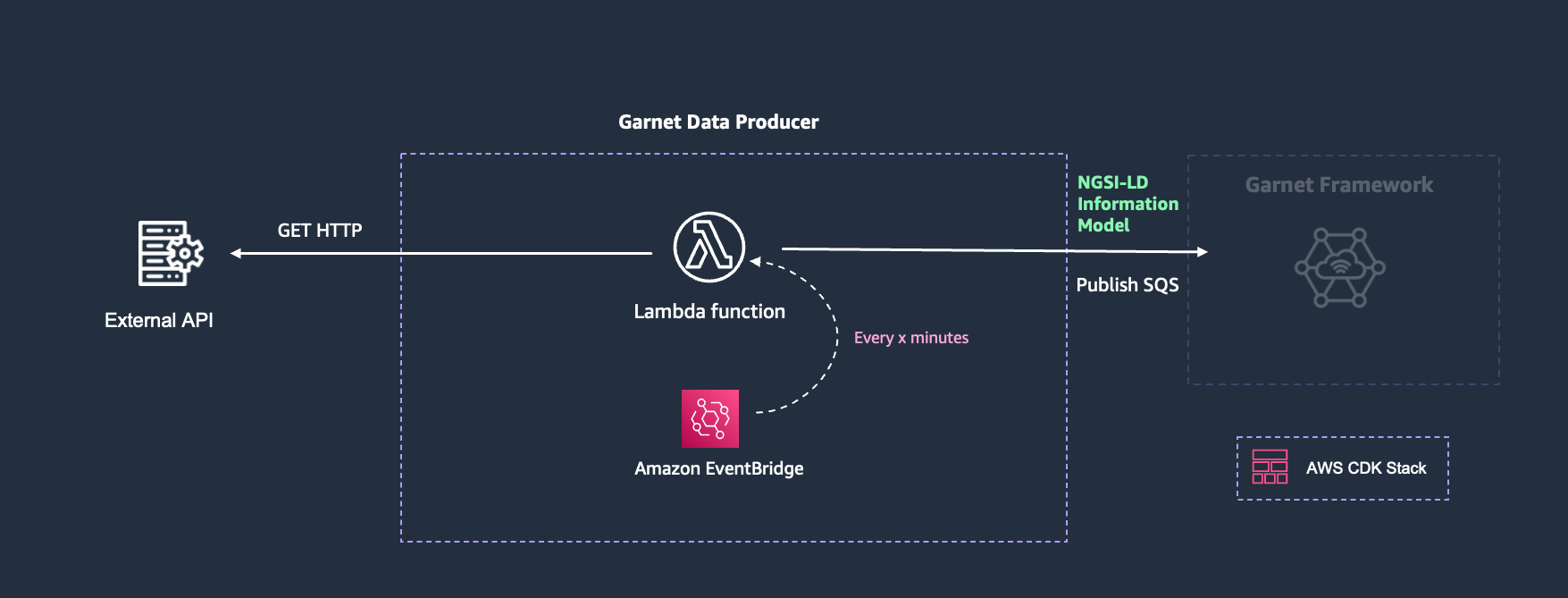
When integrating with existing systems that expose APIs, you can use scheduled Lambda functions to periodically fetch and transform data. This pattern is ideal for systems that provide REST APIs with data you want to incorporate into your knowledge graph.
Architecture Overview
The basic architecture consists of:
- EventBridge Rule: Triggers Lambda function on a schedule
- Lambda Function: Fetches data from external API and transforms it to NGSI-LD
- SQS Queue: Receives transformed entities for Garnet ingestion
Scenario: City Bike Sharing Integration
Consider a city that wants to integrate real-time bike sharing data into their smart city platform. The bike sharing company provides a public API that returns current station status, but this data needs to be transformed into the city's unified knowledge graph to enable cross-system analytics and applications.
The challenge is that the bike sharing API returns data in their own format with their own identifiers, but the city's applications need this data to be consistently available in NGSI-LD format alongside other urban mobility data like bus stops, parking meters, and traffic sensors.
Implementation Example
Here's how to build a Context Producer that periodically fetches bike sharing station data and transforms it for integration:
- Overview
- JavaScript
The Lambda function integrates with external APIs by:
- Making HTTP requests to fetch data from external systems (e.g., bike sharing API)
- Processing the API response and extracting relevant station data
- Transforming each station into NGSI-LD entities using consistent identifiers
- Using the
stationIdfrom the API as the unique identifier for consistent entity linking - Sending all transformed entities to Garnet for ingestion
The stationId from the API provides the consistent identifier for linking all data from each station.
exports.handler = async (event) => {
    try {
        // Fetch data from external API
        const response = await fetch('https://api.example.com/bike-stations');
        const stations = await response.json();

        // Transform each station
        const entities = stations.map(station => ({
            id: `urn:ngsi-ld:BikeHireDockingStation:${station.stationId}`,
            type: "BikeHireDockingStation",
            stationName: {
                value: station.name
            },
            availableBikes: {
                value: station.availableBikes,
                observedAt: station.lastUpdate // assumes ISO 8601 format (e.g., "2025-06-24T14:30:00Z")
            },
            totalSlots: {
                value: station.totalSlots
            },
            location: {
                type: "Point",
                coordinates: [station.longitude, station.latitude]
            }
        }));

        // Send all entities to SQS as batch
        await sendBatchToSQS(entities);

    } catch (error) {
        console.error('Error processing API data:', error);
        throw error;
    }
};
Creating API Endpoints for Data Reception
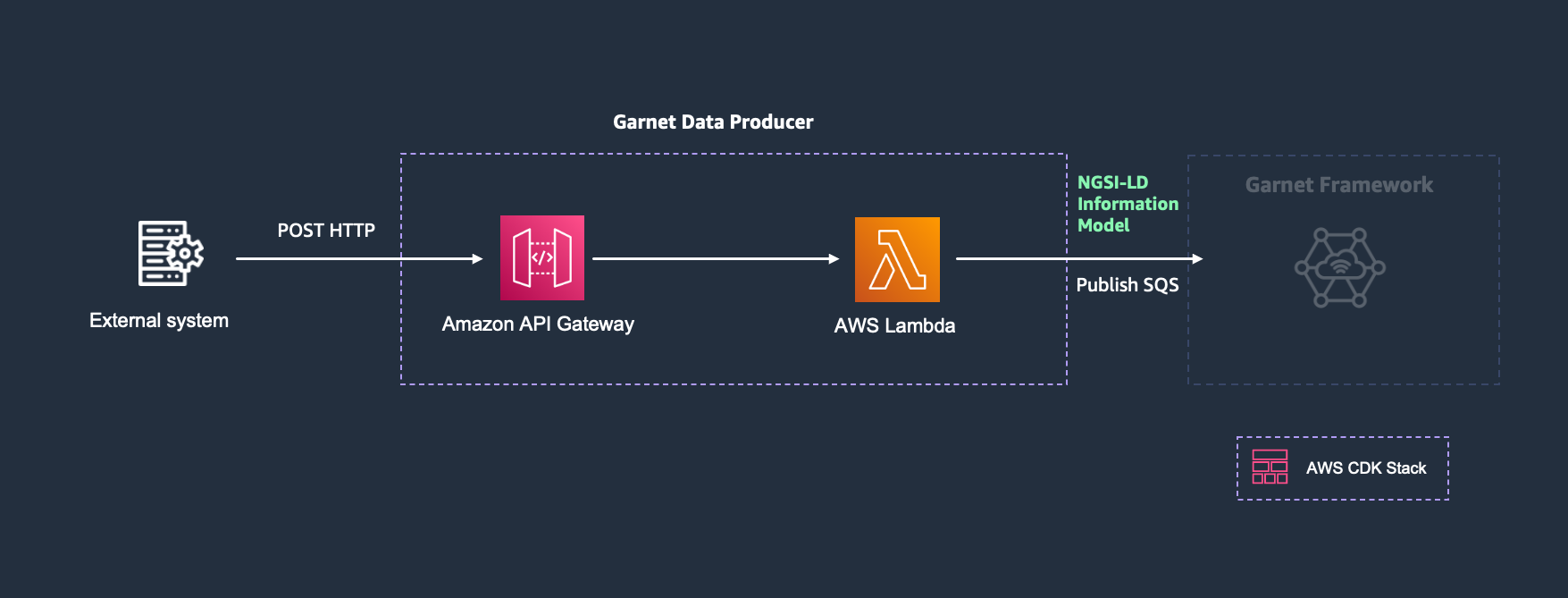
When you need to receive data from external systems, Amazon API Gateway with Lambda integration provides a scalable solution.
Architecture Components
- API Gateway: Exposes REST endpoint
- Lambda Function: Processes incoming data
- External Systems: Send data to your endpoint
- SQS Queue: Receives transformed entities
Scenario: Customer Profile Integration
Consider a retail company that operates across multiple channels - mobile app, website, in-store kiosks, and loyalty program partners. Each touchpoint collects different aspects of customer information: the mobile app captures preferences and location data, the website tracks browsing behavior and purchase history, kiosks collect in-store interactions, and loyalty partners provide external purchase data.
The challenge is that each system sends customer updates in different formats and at different times. The API endpoint must normalize this data and ensure consistent customer identification across all touchpoints while providing reliable delivery to the unified customer knowledge graph for personalized experiences and analytics.
Security Considerations
API endpoints that receive data from external systems must be properly secured to prevent unauthorized access and ensure data integrity. Consider implementing multiple security layers:
- Authentication: Use API keys, IAM roles, or OAuth tokens to authenticate clients
- Authorization: Implement fine-grained access control to limit what each client can do
- Rate Limiting: Protect against abuse with throttling and usage plans
- Input Validation: Validate all incoming data to prevent injection attacks
- HTTPS Only: Ensure all communication is encrypted in transit
For comprehensive security guidance, see API Gateway Security Best Practices.
Implementation Example
- Overview
- JavaScript
The Lambda function handles incoming API requests by:
- Parsing the JSON payload from the HTTP request body
- Extracting the customer identifier from the payload
- Transforming the received data into NGSI-LD entities
- Using the
customerIdas the unique identifier for consistent entity linking across touchpoints - Sending the entity to Garnet for ingestion
- Returning appropriate HTTP responses to the client
exports.handler = async (event) => {
    try {
        // Parse incoming customer data
        const payload = JSON.parse(event.body);

        // Extract customer identifier
        const customerId = payload.customerId;
        const source = payload.source; // mobile, web, kiosk, partner

        // Transform to NGSI-LD entity
        const entity = {
            id: `urn:ngsi-ld:Customer:${customerId}`,
            type: "Customer",
            lastUpdated: {
                value: new Date().toISOString(),
                observedAt: new Date().toISOString()
            },
            dataSource: {
                value: source
            }
        };

        // Add source-specific attributes
        if (payload.preferences) {
            entity.preferences = {
                value: payload.preferences,
                observedAt: payload.timestamp
            };
        }

        if (payload.purchaseHistory) {
            entity.totalPurchases = {
                value: payload.purchaseHistory.totalAmount,
                unitCode: "USD",
                observedAt: payload.timestamp
            };
        }

        if (payload.loyaltyPoints) {
            entity.loyaltyPoints = {
                value: payload.loyaltyPoints,
                observedAt: payload.timestamp
            };
        }

        // Send to SQS as batch
        await sendBatchToSQS([entity]);

        return {
            statusCode: 200,
            body: JSON.stringify({ message: 'Customer data processed successfully' })
        };

    } catch (error) {
        console.error('Error processing customer data:', error);
        return {
            statusCode: 500,
            body: JSON.stringify({ error: 'Internal server error' })
        };
    }
};
This pattern enables multiple touchpoints to push customer data directly to your Context Producer through standard HTTP requests. Ensure proper authentication and authorization are configured at the API Gateway level.
Using AWS IoT Core for LoRaWAN
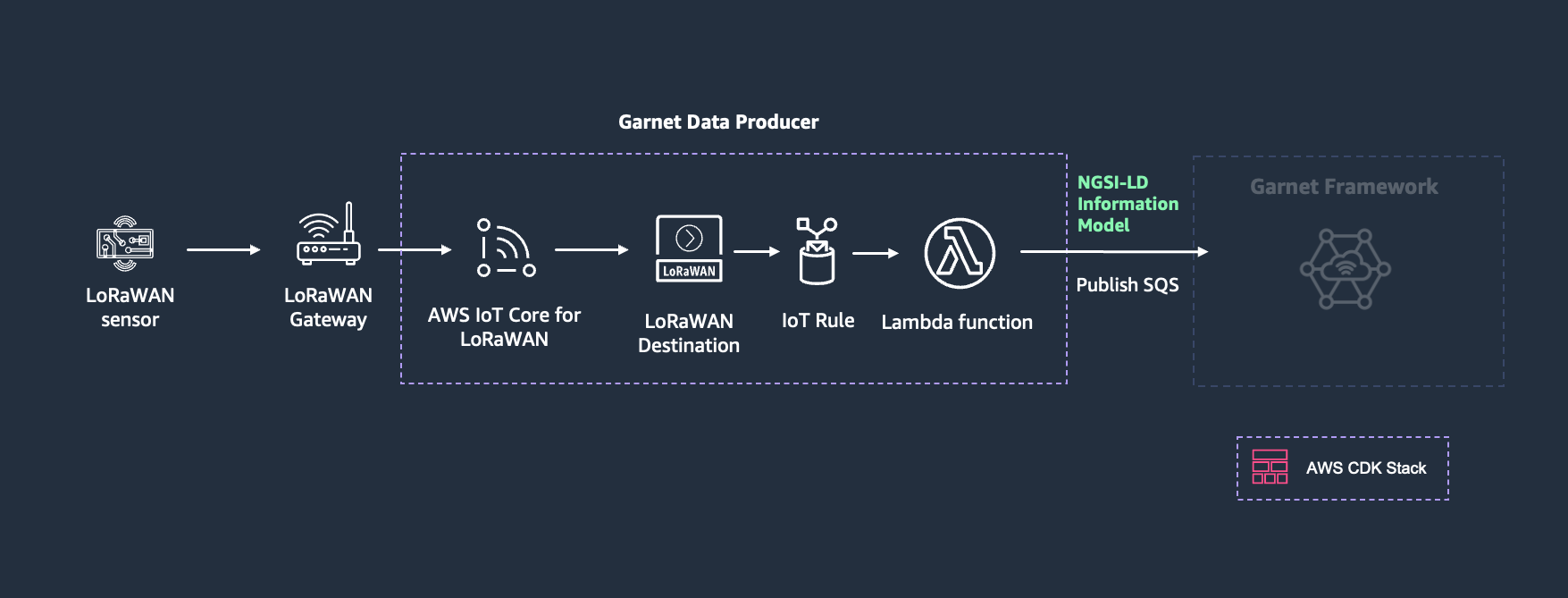
AWS IoT Core for LoRaWAN is a fully managed LoRaWAN network server (LNS) that enables you to connect wireless devices that use the LoRaWAN protocol to AWS IoT Core. While this example uses AWS IoT Core for LoRaWAN, the same Context Producer pattern can be adapted for other LoRaWAN network servers by adjusting the data ingestion method and payload structure.
Architecture Components
- LoRaWAN Devices: Send sensor data through LoRaWAN protocol
- AWS IoT Core for LoRaWAN: Receives and routes device messages
- IoT Rule: Routes messages to Lambda function
- Lambda Function: Decodes payload and creates NGSI-LD entities
- SQS Queue: Receives entities for Garnet ingestion
Scenario: Smart Building Environmental Monitoring
Consider a smart building management company that deploys LoRaWAN sensors throughout office buildings to monitor indoor air quality. These battery-powered sensors measure temperature, humidity, CO2 levels, and battery level, transmitting data every 15 minutes to optimize HVAC systems and ensure occupant comfort. Since the payload includes both environmental measurements and device status information, the Context Producer updates two separate entities: the sensor entity (with battery level and other device attributes) and an observation entity (with the environmental measurements), linked through relationships.
LoRaWAN payloads are limited in size, so sensors transmit only essential readings. However, the building management company can onboard entities with static information (like location and room placement) which then gets complemented dynamically by sensor readings from Context Producers. The knowledge graph aggregates both static and dynamic information around the same entities, creating a single source of truth that combines all available information. This enables comprehensive data retrieval through linked entity queries that can retrieve sensor details, room context, and measurements in a single request. For more information on linked entity retrieval, see Retrieving Linked Entities.
Implementation Steps
- Device Registration: Onboard LoRaWAN devices to AWS IoT Core for LoRaWAN
- Device Onboarding to Garnet: Create sensor entities in Garnet with static information like location, serial number, installation date, room relationships, and other metadata that won't be transmitted through LoRaWAN payloads. Using the DevEUI (the LoRaWAN device identifier) in the entity ID provides a convenient way to link the static entity with dynamic updates from the Context Producer, since the DevEUI is included in the LoRaWAN payload
- Lambda Function: Create a function to process LoRaWAN messages and create NGSI-LD entities - this function decodes sensor payloads, transforms the data into NGSI-LD format, and sends entities to Garnet
- IoT Rule: Route device messages to the Lambda function
- Destination Assignment: Configure devices to use the IoT Rule
Lambda Function Example
- Overview
- JavaScript
The Lambda function processes LoRaWAN messages by:
- Extracting the DevEUI (unique device identifier) from the message metadata
- Decoding the sensor-specific payload data
- Creating two NGSI-LD entities: one for the sensor (device-level attributes like battery level) and one for observations (measurement data)
- Establishing relationships through the
measuredByattribute linking observations to their sensor - Sending both entities to Garnet's SQS ingestion queue
exports.handler = async (event) => {
    try {
        // Extract metadata from LoRaWAN message
        const { PayloadData, WirelessMetadata: { LoRaWAN: { DevEui, Timestamp } } } = event;

        // Decode base64 payload
        const buffer = Buffer.from(PayloadData, 'base64');

        // Create sensor entity for device-level attributes
        const sensorEntity = {
            id: `urn:ngsi-ld:AirQualityIndoorSensor:AIQ-${DevEui}`,
            type: "AirQualityIndoorSensor"
        };

        // Create observation entity for measurement data
        const observationEntity = {
            id: `urn:ngsi-ld:IndoorEnvironmentObserved:AIQ-${DevEui}`,
            type: "IndoorEnvironmentObserved",
            dateObserved: {
                value: Timestamp
            },
            measuredBy: {
                type: "Relationship",
                object: `urn:ngsi-ld:AirQualityIndoorSensor:AIQ-${DevEui}`,
                objectType: "AirQualityIndoorSensor"
            }
        };

        // Parse sensor data from buffer (simplified example)
        // Assuming fixed payload structure for demonstration

        // Temperature (bytes 0-1, signed 16-bit, divide by 10)
        observationEntity.temperature = {
            value: buffer.readInt16LE(0) / 10,
            unitCode: "CEL",
            observedAt: Timestamp
        };

        // Humidity (byte 2, unsigned 8-bit, divide by 2)
        observationEntity.relativeHumidity = {
            value: buffer.readUInt8(2) / 2,
            unitCode: "P1",
            observedAt: Timestamp
        };

        // Battery level (byte 3, unsigned 8-bit percentage)
        sensorEntity.batteryLevel = {
            value: buffer.readUInt8(3),
            unitCode: "P1",
            observedAt: Timestamp
        };

        // Send both entities to SQS as batch
        await sendBatchToSQS([sensorEntity, observationEntity]);

    } catch (error) {
        console.error('Error processing LoRaWAN message:', error);
        throw error;
    }
};
This demonstrates how a single Context Producer can update multiple entity types from one data source. The battery level belongs to the sensor entity, while temperature and humidity measurements belong to the observation entity, linked through the measuredBy relationship. The DevEUI provides the consistent identifier for both entities.
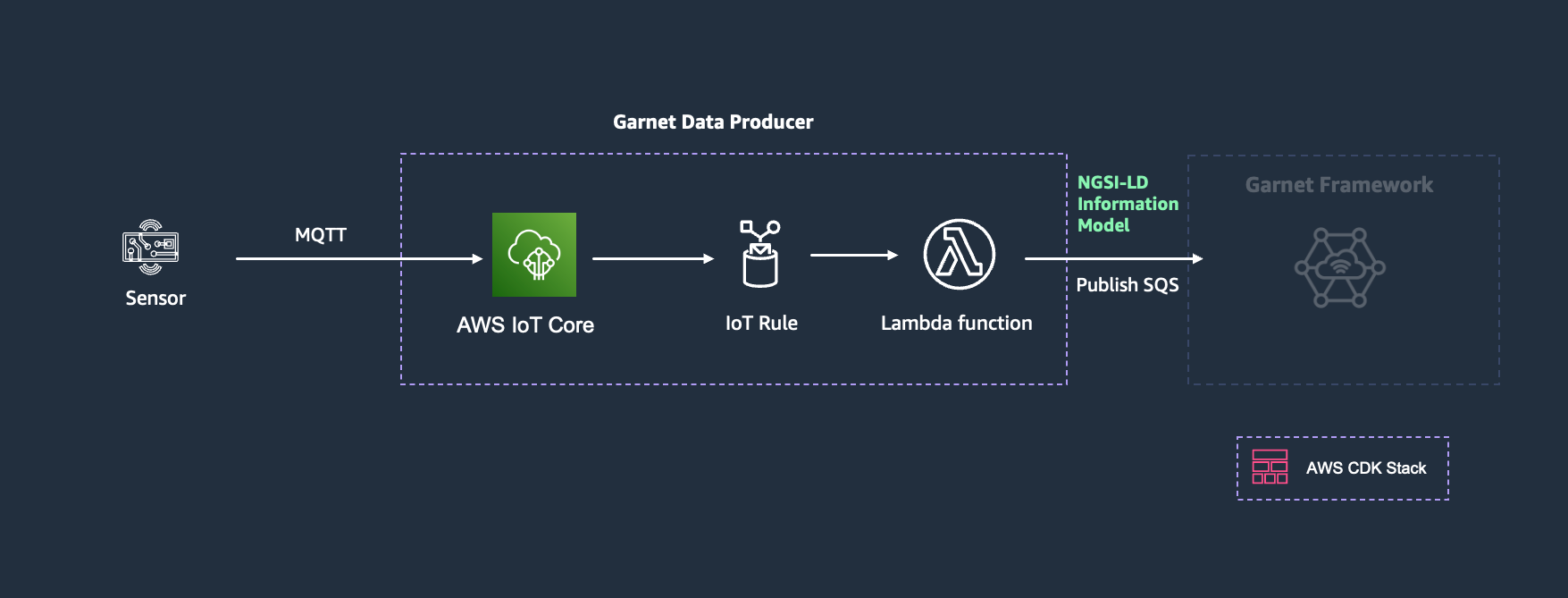
Using AWS IoT Core MQTT Broker
For devices that communicate using MQTT protocol, AWS IoT Core provides a managed MQTT broker with built-in security and routing capabilities.
Architecture Components
- MQTT Devices: Publish data to IoT Core topics
- AWS IoT Core: Manages device connections and message routing
- IoT Rule: Routes messages to Lambda function
- Lambda Function: Transforms messages to NGSI-LD
- SQS Queue: Receives entities for ingestion
Scenario: Industrial Equipment Monitoring
Consider a manufacturing facility that needs to monitor critical machinery across multiple production lines. Each machine has vibration sensors attached to monitor engine health and detect early signs of mechanical issues. These sensors communicate via MQTT, sending vibration data that enables predictive maintenance algorithms to identify potential failures before they cause costly downtime.
The challenge is ensuring secure, reliable communication from hundreds of sensors while maintaining consistent device identification and proper relationships between sensors and the machines they monitor. Each sensor must be properly authenticated and its data must be linked to the correct machine entity in the maintenance system.
Implementation Steps
- Device Registration: Create things in AWS IoT Core registry with meaningful names that align with your NGSI-LD entity naming convention. Garnet automatically syncs AWS IoT Thing lifecycle events (creation, deletion, group membership, connectivity status) as
AwsIotThingentities through AWS IoT integration. Users can add static information like location and installation details to these entities (either before or after the sync creates them), including theplacedInrelationship to attach sensors to machines. The Context Producer then updates these entities with sensor data and benefits from real-time connectivity status provided by the sync - Certificate Management: Attach certificates and policies, ensuring each device uses its thing name as the client ID
- IoT Rule Creation: Route MQTT messages to Lambda function for processing
- Lambda Function: Process and transform messages using the thing name for consistent entity identification
IoT Rule Examples
You have two main approaches for device identification:
If your device is already registered with AWS IoT Core, use the clientid() function to get the thing name directly. This works when the device connects using its thing name as the client ID, as described in the Associating an AWS IoT thing to an MQTT client connection documentation:
SELECT *, clientid() as thingName
FROM 'sensors/+/data'
If you're setting up your own topic structure, you can include the thing name in the topic and extract it:
SELECT *, topic(2) as thingName
FROM 'sensors/+/data'
Where the topic structure could be sensors/{thingName}/data.
The clientid() approach leverages AWS IoT Core's device registry and authentication, while the topic-based approach gives you flexibility in topic design. For detailed information about IoT SQL functions, see the AWS IoT SQL Reference.
Lambda Function Example
- Overview
- JavaScript
The Lambda function processes MQTT messages by:
- Extracting the thing name using the
clientid()function from the IoT Rule - Accessing the MQTT payload data directly from the event
- Creating a VibrationSensor entity with only the sensor data (vibration level, frequency)
- Assuming the sensor entity was already created with static information including machine relationships
- Sending the sensor entity to Garnet for ingestion
exports.handler = async (event) => {
    // Extract thing name from clientid() function
    const thingName = event.thingName;

    // Create VibrationSensor entity with sensor data only
    // Note: We assume the sensor entity was already created with static information
    // including the placedIn relationship to its machine. The Context Producer
    // only updates the entity with new sensor measurements.
    const sensorEntity = {
        id: `urn:ngsi-ld:VibrationSensor:${thingName}`,
        type: "VibrationSensor",
        vibrationLevel: {
            value: event.vibrationLevel,
            unitCode: "MTR", // meters per second squared
            observedAt: new Date().toISOString()
        },
        frequency: {
            value: event.frequency,
            unitCode: "HTZ", // hertz
            observedAt: new Date().toISOString()
        }
    };

    await sendBatchToSQS([sensorEntity]);
};
This demonstrates how a Context Producer updates entities based only on the data the sensor provides, without establishing relationships that should be managed separately. The sensor entity is assumed to have been previously created with static information including its placedIn relationship to the machine. Applications needing holistic machine views can use subscriptions to aggregate sensor data and update machine entities with derived insights - for example, a predictive maintenance system could subscribe to vibration sensor updates and calculate overall machine health status based on multiple sensor readings. For more information on building such aggregated views, see Advanced Patterns: Aggregated Views.
Next Steps
With Context Producers feeding data into your knowledge graph, you can now build Context Consumers that leverage this unified information. The next section covers how to create applications that consume and act upon the contextual intelligence your producers have created.
You can also explore practical examples in the tutorials section that demonstrate complete end-to-end implementations combining multiple Context Producers with various Context Consumers.