Ingesting NGSI-LD Data
Garnet Framework has evolved with architectural improvements for better cost efficiency and scalability. This documentation is current and reflects these changes, though we continue to expand certain sections with additional examples and detailed guidance.
Thank you for your patience as we complete this update.
Overview
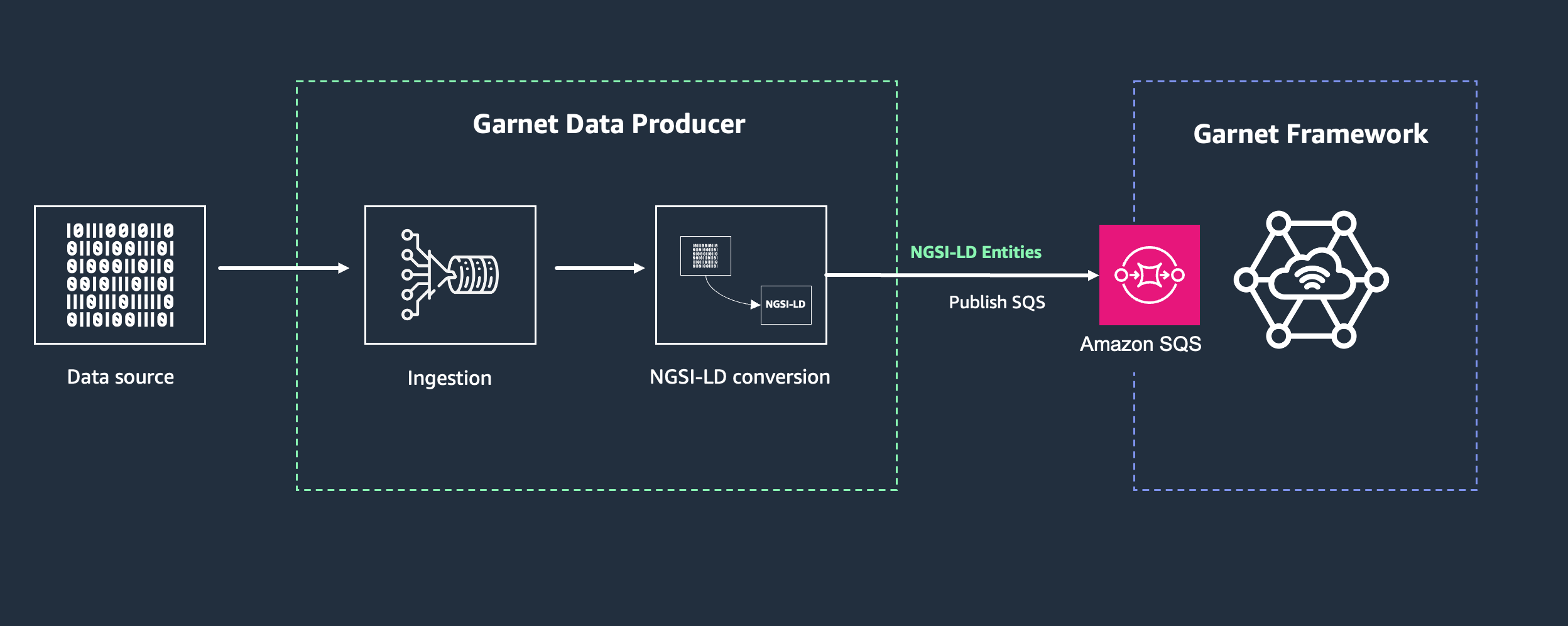
Garnet Framework provides a dedicated Amazon SQS queue for ingesting NGSI-LD entities into your knowledge graph. This queue-based approach simplifies data ingestion by handling message batching and updates automatically.
Using the Ingestion Queue
The queue URL is provided as a CloudFormation output - GarnetIngestionQueue - and is also available when fetching the Garnet endpoint.
The ingestion queue follows a consistent naming convention: garnet-ingestion-queue-{region}, where {region} is the AWS region where your Garnet stack is deployed. For example, if you deployed Garnet in the us-east-1 region, the ingestion queue would be named garnet-ingestion-queue-us-east-1.
The complete SQS queue URL format is:
https://sqs.{region}.amazonaws.com/{account-id}/garnet-ingestion-queue-{region}
For example, if your AWS account ID is 123456789012 and you deployed in us-east-1, the full queue URL would be:
https://sqs.us-east-1.amazonaws.com/123456789012/garnet-ingestion-queue-us-east-1
Simply push your NGSI-LD compliant entities to this queue, and Garnet will handle the rest.
Ensure your application has the necessary IAM permissions for the ingestion queue. At minimum, your application will need the sqs:SendMessage permission for the ingestion queue.
When you send NGSI-LD entities to the Garnet ingestion queue, the system processes them through the following flow:
- SQS Queue: Your NGSI-LD entities are buffered in the Amazon SQS ingestion queue, which provides reliable message delivery and handles traffic spikes
- Lambda Processing: AWS Lambda functions fetch messages from the queue in batches according to your configuration settings
- Batch Upsert with Update Option: The Lambda function performs batch upsert operations with the
options=updateparameter to preserve existing attributes while updating only those provided in the payload
This approach allows you to create entities with static attributes (like location or device metadata) and then use the ingestion queue to update only the dynamic parts of your entities (like sensor readings or status changes) without overwriting the entire entity. For example, you could create a device entity with its location and configuration, then continuously send temperature updates through the queue that will only update the temperature attribute while preserving all other existing attributes.
Batch Configuration
If you need to adjust the ingestion behavior, you can modify these parameters in the architecture.ts file:
lambda_broker_batch_window: 1,    // Maximum wait time (seconds) to gather messages
lambda_broker_batch_size: 10,     // Maximum number of messages per batch
lambda_broker_concurent_sqs: 10,  // Maximum concurrent Lambda invocations
For detailed information about these settings, see Using Lambda with SQS.
Each message sent to the ingestion queue must contain a valid NGSI-LD entity in JSON format. The entity structure follows the same format as when interacting directly with the Context Broker through the API. As with direct API interactions, you can choose whether to include an @context attribute in your entities - if omitted, the default NGSI-LD core context will be used. For detailed information about NGSI-LD entity structure and context usage, refer to the Understanding NGSI-LD section.
Benefits of the Queue-Based Approach
The SQS queue-based approach forf ingesting NGSI-LD entities offers several advantages. The queue provides reliability by ensuring messages persist until they are successfully processed, even if temporary issues occur. It enables scalability by handling traffic spikes with controlled processing, preventing system overload during peak ingestion periods. The system efficiently processes multiple entities through batching, optimizing throughput and reducing costs. Additionally, security is enhanced through AWS IAM permissions, giving you fine-grained access control over who can send data to your knowledge graph.
Next Steps
In the Garnet Framework architecture, Data Producers are components that ingest data from sources and convert it into NGSI-LD entities before sending them to the ingestion queue. A dedicated section on building data producers will be available soon with detailed guidance on creating these components for various data sources.
Now that you understand how to ingest data into your knowledge graph, proceed to Using the Data Lake to learn how to access and analyze the historical data stored in your Garnet deployment.